
Plan the network between Pilot and centerfield
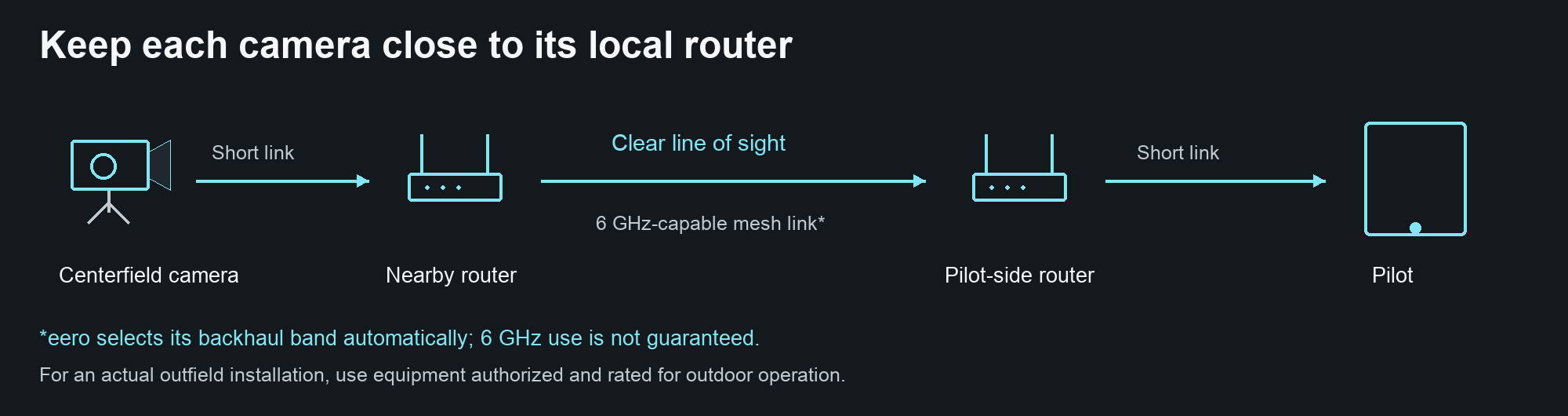
Keep cameras near their local router and give the router-to-router link a clear path.
General guidance · Check the controls available in your installed app.
One router near Pilot, one near the camera
Use a two-node layout: place one mesh router close to the Pilot device and a second close to the centerfield camera, with clear line of sight between routers. Keep both devices on the same local network. Connect the camera to its nearby node; an Ethernet camera connection, when supported, removes that wireless hop. Use hardware authorized for the actual installation.
Tri-band eero options with 6 GHz
eero Pro 6E (S010001 / S010011), eero Pro 7 (ME10001 / ME10111), eero Max 7 (V010001), and eero PoE 7 (NV01 / NV14111; labels vary) support 2.4, 5, and 6 GHz. Pro 6E uses Wi-Fi 6E; the other three use Wi-Fi 7. Two compatible eero nodes can form the mesh. eero 7, eero Outdoor 7, eero 6 Extender and Beacon do not meet the tri-band-plus-6-GHz requirement.
6 GHz capable does not mean 6 GHz guaranteed
Backhaul is the connection carrying traffic between routers. eero chooses its backhaul band dynamically; adding two tri-band nodes does not force a dedicated 6 GHz connection. Line of sight helps, but distance, interference, crowd movement and obstructions affect performance. Camera Wi-Fi and router backhaul can use different bands. A 5 GHz camera can use a local router whose backhaul uses 6 GHz.
Indoor versus outdoor note
The listed eero models are indoor equipment, not weatherproof outfield routers. In the US, low-power indoor 6 GHz access points are restricted to indoor operation; placing them in a protective box or using a battery does not change their authorization. For actual outfield use, choose equipment explicitly authorized and rated for outdoor operation. A standard-power outdoor 6 GHz installation generally requires AFC, the channel-coordination service. eero Outdoor 7 is an outdoor option, but it has no 6 GHz band.
Test all cameras together before the game
Run every intended camera and the outgoing broadcast together at game-day settings before first pitch. Watch camera health meters and outgoing network health. Move a node closer or improve the path if a feed deteriorates. Internet upload capacity is separate from local mesh throughput; a healthy camera link cannot fix an overloaded internet uplink. No distance or speed in this guide guarantees a stable broadcast.