
Inning Pilot
A multicamera studio. A better view of the game.
Bring your camera angles into one iPhone or iPad studio. Preview the action, choose the shot yourself, or let Inning Pilot switch cameras as the game unfolds. Add wireless camera angles and sound with its companion app, Inning Pilot Spotter.
Contact us about access Help & TroubleshootingMade for baseball and softball
Bring more of the game into view.
See your camera angles
Preview feeds in one place and choose the view that tells the story. Connect multiple phones running Inning Pilot Spotter to add wireless cameras and microphones.
Direct the game your way
Switch between cameras manually or use AI-assisted switching with automatic scene cuts based on in-game action.
Give the big moments another look
Built-in pitch trajectory replays, slow-motion replays, and highlight reels help bring more of the game into your production.


Keep your picture level
Auto-leveling helps restore the picture when a camera has moved, keeping attention on the field.
Broadcast and record
Send your production live or record it locally so you can keep a copy of the game.
Manage the sound
Watch audio levels, adjust source volumes, and mute inputs from the studio to keep the mix under control.
More of your production, in one studio
Camera setup and framing
- Bring compatible network cameras and Inning Pilot Spotter feeds into the same studio.
- Preview, arrange, and switch camera angles; adjust supported camera controls from Pilot.
- Crop, rotate, and level the picture to suit your production.
- The number and quality of input streams and broadcast streams depend on your device’s processing power and network capability.
Manual and AI-assisted direction
- Make every cut yourself, observe AI cues, or use automatic switching based on in-game action.
- Add configurable pitch velocity, projected exit velocity, and strike-zone graphics.
- Check feed health and production performance while you work.
Audio and recording
- Balance camera and microphone inputs with individual faders and master output volume.
- Mute local monitoring independently of the audio going to your recording or broadcast.
- Record Program, original camera feeds with audio, or both.
Media, replays, and highlights
- Bring videos, pictures, graphics, text overlays, and count-up or countdown timers into the production.
- Prepare replays with selected ranges and playback speeds, then build a Highlight Reel.
- Use playlists to play media once, repeat it, or shuffle the sequence.
Broadcast destinations
- Configure GameChanger, SidelineHD, YouTube, or a custom RTMP or RTMPS destination.
- Send your selected picture, active graphics, and mixed audio together as Program.
- Broadcast to as many destinations as your device’s processor and available upload bandwidth allow.
A companion camera crew
- Build your crew with multiple phones or tablets: each compatible iPhone, iPad, or Android device running Inning Pilot Spotter can contribute a camera and microphone.
- Keep the studio in Pilot while supported remote camera controls help manage each angle.
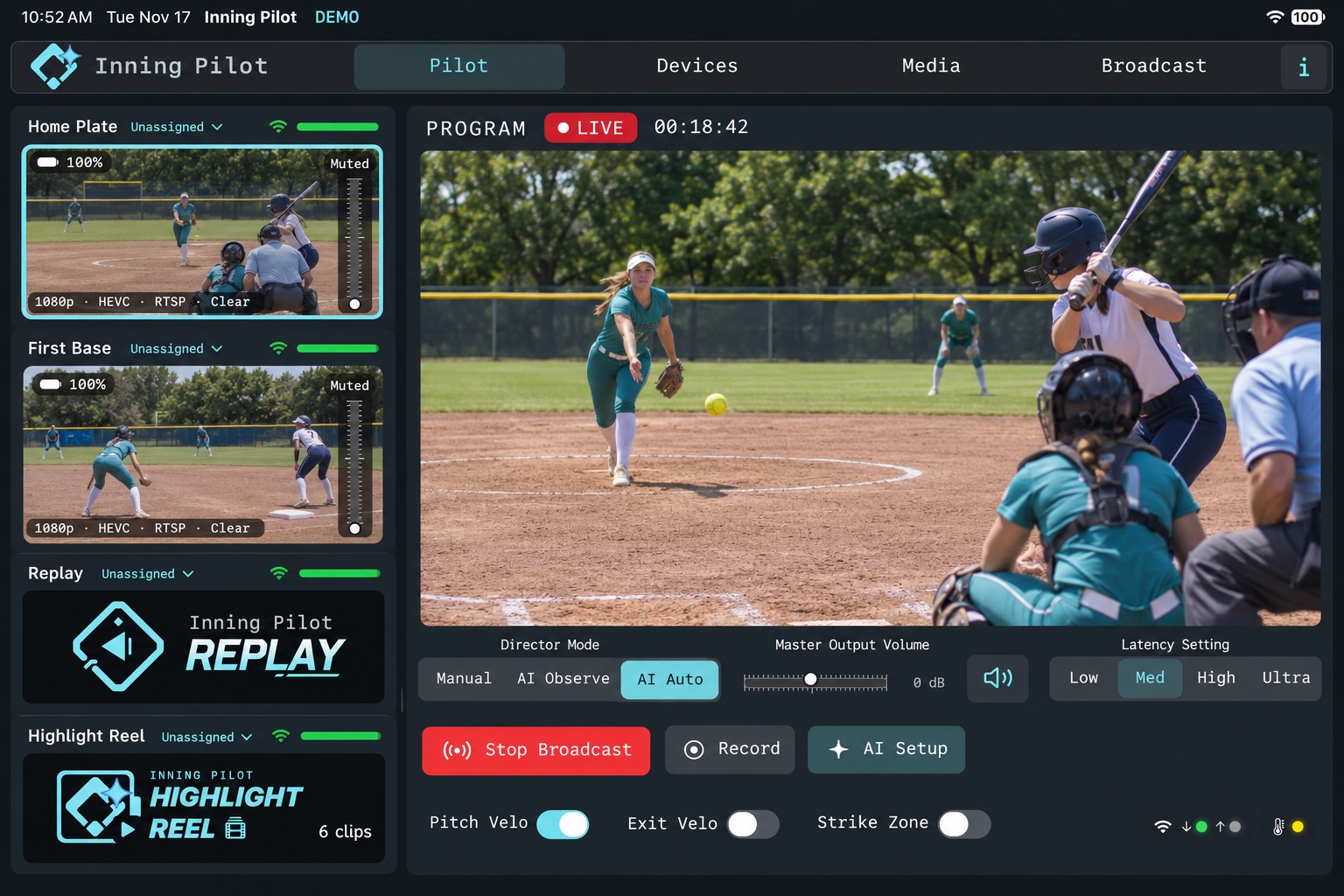
Your game-day setup
Connect your cameras, check your previews, and take control from your iPhone or iPad. Keep a hand on the production or let Inning Pilot assist while you follow the game.
Camera compatibility and available features depend on the device and setup.
Meet Inning Pilot Spotter.
Spotter is the companion camera and microphone app for Inning Pilot. Use multiple iPhone, iPad, or Android devices to add wireless views and bring field sound into your production.
Measuring our progress
Atlas AI Engine performance
Current Version: Atlas AI Engine v8.1.1
Production build
Detected 83.6% of reviewed bat-contact plays in internal replay testing.
Experimental build
Detected 86.9% on the same test set.
Why we share these results
We publish these benchmarks to make our progress visible and give you a clearer picture of what Inning Pilot can detect today. As our machine learning, pose-analysis, and neural models mature, we’ll keep this section updated with reviewed results.
Testing both builds on the same set helps us compare improvements consistently. These figures describe detection of reviewed bat-contact plays in internal replay testing; live results can vary with camera angle, visibility, lighting, and setup.
Last updated .
Let’s talk about your game.
For access, support, or feedback, email owner@fourseamsoftware.com.